Wednesday, 24 March 2021

Sample HDL for Closing Payroll

METADATA|AssignedPayroll|AssignmentNumber|LegislativeDataGroupName|PayrollDefinitionCode|StartDate|CloseDate|EffectiveStartDate|EffectiveEndDate

MERGE|AssignedPayroll|E1001|US Legislative Data Group|Semi Monthly|2021/01/05|2021/03/31 00:00:00|2021/01/05|2021/03/31

MERGE|AssignedPayroll|E1002|US Legislative Data Group|Semi Monthly|2021/01/05|2021/03/31 00:00:00|2021/01/05|


Close Date should be passed in the format - yyyy/mm/dd hh24:mi:ss. Otherwise error will be thrown.

Effective End Date if left blank also works the same way in above case as I did for the second employee above.

Tuesday, 16 March 2021

Query to fetch Payroll Relationship and Person Numbers from Object Group

 Query to fetch Payroll Relationship and Person Numbers from Object Group which are added as static.

select
papf.person_number,ppnf.full_name,pprd.PAYROLL_RELATIONSHIP_NUMBER,poga.*
from 
per_all_people_f papf,
per_person_names_f ppnf,
per_all_assignments_f paaf,
pay_payroll_assignments ppasg,
pay_pay_relationships_dn pprd,
pay_object_group_amends poga,
pay_object_groups pog
where 1=1
and papf.person_id = paaf.person_id
and papf.person_id = ppnf.person_id
and paaf.assignment_id = ppasg.hr_assignment_id
--and paaf.person_id = ppasg.person_id
and ppasg.payroll_relationship_id = pprd.payroll_relationship_id
and pog.OBJECT_GROUP_ID=poga.OBJECT_GROUP_ID
and poga.object_id=pprd.payroll_relationship_id
and paaf.PRIMARY_FLAG ='Y'
--and paaf.ASSIGNMENT_TYPE = 'E'
and trunc(sysdate) between papf.effective_start_date and papf.effective_end_date
and trunc(sysdate) between ppnf.effective_start_date and ppnf.effective_end_date
and trunc(sysdate) between paaf.effective_start_date and paaf.effective_end_date
and trunc(sysdate) between ppasg.start_date and ppasg.end_date
and ppnf.name_type='GLOBAL'
and base_object_group_name like 'Object_Group_Name'

Thursday, 4 February 2021

Query to check USER level Profile Option Value in Oracle Cloud HCM

I needed a query to fetch the profile option values at USER level for Language Preference set by the employee. So here is what I had written, let me know if any change is required.


SELECT
    fnd.language_code
FROM
    fnd_profile_options_b      b,
    fnd_profile_option_values  v,
    per_users                  per,
    fnd_languages_vl           fnd
WHERE
        v.level_value = per.user_guid
    AND b.profile_option_id = v.profile_option_id
    AND per.person_id IS NOT NULL
    AND b.profile_option_name = 'FND_LANGUAGE'
    AND v.level_name = 'USER'
    AND v.profile_option_value = fnd.language_tag
    AND fnd.activation_status = 'ACTIVE'
    AND per.person_id = (select distinct person_id from per_all_people_f where person_number='123456')

Thursday, 4 June 2020

Sample Bursting query for FTP file in BI Publisher

SELECT 'JOB' as "KEY",
     'eText_Job' TEMPLATE,
     'ETEXT' TEMPLATE_FORMAT,
     'en-US' LOCALE,
     'TEXT' OUTPUT_FORMAT,
     'JOB_FTP' output_name,
     'FTP' DEL_CHANNEL,
     'INTERFACE_TEST' PARAMETER1,--server name set on xmlpserver as admin
     'userid' PARAMETER2,--userid
     'password#1234' PARAMETER3,--password
     '/DIR_TEST/FOLDER' PARAMETER4,--file path
     'JOB_FTP.txt'  PARAMETER5,--file name
     'true' PARAMETER6--secure ftp or not
FROM dual

Thursday, 28 May 2020

Note about prorating a recurring element with a negative amount

Just a note, when a recurring element is fed a negative amount and has a proration formula on it, the element gets processed in the payroll only when the eff. start date of it is the start of pay period, otherwise it wont be processed. But in case of positive amount, proration works fine. Not sure if its a functionality or a bug.

OTBI report to show person Images

Hello All. I recently came across a cool report to show person Images in OTBI.

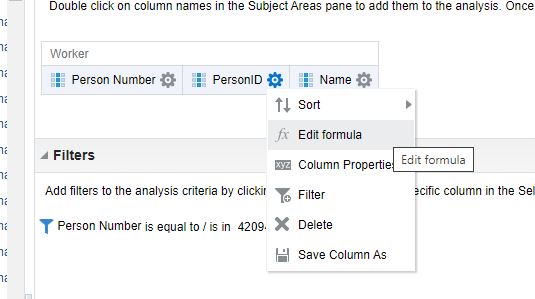
Go to the subject area Workforce Management - Person Real Time. Add Person Number, Person ID and Name columns(can be any column). Click on Settings- Edit Formula on one of the columns and add the below code.
Limitation is that report with images cannot be exported.

'<img src="/hcmUI/personImage?personId='||CAST("Worker"."Person ID" AS char)||'">'
or
'<img src=/hcmUI/personImage?personId='||CAST("Worker"."Person ID" AS char)||'>'


Click OK.

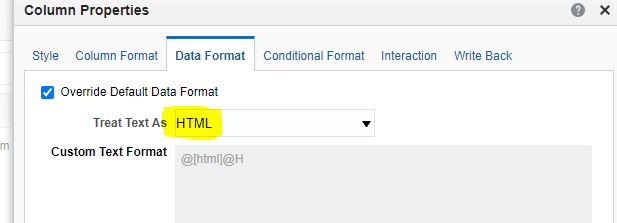
Click on Settings - Column Properties - Data Format - Treat Text as HTML.


Click OK.

View the results. You can view the employee images.


Thursday, 21 May 2020

Query to fetch Payroll Balance details in Oracle HCM - Cloud

The below query can be used to fetch a Payroll Balance(SIT Withheld) on the Separate Run run type(Relationship State Run dimension). This Separate Run run type will generally be used for Bonus elements.


select papf.person_number,pprd.payroll_relationship_number,
ppnf.full_name,BASE_RUN_TYPE_NAME,RUN_METHOD,SHORTNAME,
to_char(ppa.effective_date,'rrrr/mm/dd')  process_date,
to_char(ppa.date_earned,'rrrr/mm/dd') date_earned,
bal.balance_value "REL ASG RUN BALANCE",
bal.ctx_user_string "Reference"
from
per_all_people_f papf,
per_person_names_f ppnf,
per_all_assignments_f paaf,
PER_PERIODS_OF_SERVICE ppos,
pay_payroll_assignments ppasg,
PAY_ASSIGNED_PAYROLLS_DN papd,
pay_all_payrolls_f pap,
pay_pay_relationships_dn pprd,
pay_payroll_actions ppa,
pay_payroll_rel_actions ppra,
pay_run_types_f prt,
pay_dimension_usages_vl pdu,
pay_balance_types_vl pbt,
table(pay_balance_view_pkg.get_balance_dimensions
(p_balance_type_id => pbt.balance_type_id
,p_payroll_rel_action_id => ppra.payroll_rel_action_id
,p_payroll_term_id => null
,p_payroll_assignment_id => null
)) bal
where 1=1
and papf.person_id = paaf.person_id
and papf.person_id = ppnf.person_id
and papf.person_id = ppos.person_id
and paaf.period_of_service_id = ppos.period_of_service_id
and paaf.assignment_id = ppasg.hr_assignment_id
and ppasg.payroll_term_id = papd.payroll_term_id
and papd.payroll_id = pap.payroll_id
and ppasg.payroll_relationship_id = pprd.payroll_relationship_id
and pprd.payroll_relationship_id = ppra.payroll_relationship_id
and ppra.payroll_action_id = ppa.payroll_action_id
and ppa.payroll_id = pap.payroll_id
and ppra.run_type_id = prt.run_type_id
and paaf.PRIMARY_FLAG ='Y'
and paaf.ASSIGNMENT_TYPE = 'E'
AND PPOS.date_start = (SELECT max(date_start) FROM PER_PERIODS_OF_SERVICE PPOS_IN WHERE PPOS_IN.person_id = PAPF.person_id)
and trunc(sysdate) between papf.effective_start_date and papf.effective_end_date
and trunc(sysdate) between ppnf.effective_start_date and ppnf.effective_end_date
and trunc(sysdate) between paaf.effective_start_date and paaf.effective_end_date
and trunc(sysdate) between prt.effective_start_date and prt.effective_end_date
and trunc(sysdate) between ppasg.start_date and ppasg.end_date
and trunc(sysdate) between papd.start_date and papd.end_date
and trunc(sysdate) between pap.effective_start_date and pap.effective_end_date
and ppnf.name_type='GLOBAL'--'US'
and paaf.assignment_type IN ('E','C','P','N')
and ppa.action_type in ('R','Q')
and ppra.run_type_id is not null
and ppa.effective_date = to_date('30-04-2020','dd-mm-rrrr')
and prt.BASE_RUN_TYPE_NAME = 'Separate Payment'
and pdu.balance_dimension_id = bal.balance_dimension_id
and pbt.balance_name='SIT Withheld'
and pdu.dimension_name = 'Relationship State Run'
and bal.balance_value <> 0
and papf.person_number in ('12345')